

Create Order
Place a purchase order on Amazon, Walmart, and other retailers via the Zinc API.
Request Flow
- Submit Order - Send order details including products and shipping address
- Validation - We validate product URLs and shipping address
- Queued - Order is queued for processing
- Processing - Our system places the order with the retailer
- Completed - You receive confirmation with tracking details
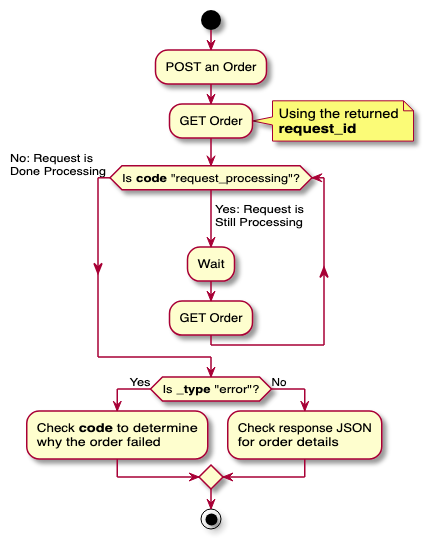
Order processing flow
Product URLs
Provide direct product URLs. Zinc resolves the retailer from the URL itself, and will attempt checkout at most online stores — not only the ones in the retailer catalog. That catalog is the set Zinc verifies with daily test orders, not the limit of what it can buy from: a store missing from it is not unsupported. Each product must include:- url - Direct link to the product page
- quantity - Number of items to order (integer, default 1)
- variant - A list of label, value pairs indicating a variant of a product.
For example, if you’re ordering a shirt. The shirt may come in different colors and different sizes.
To indicate a red medium shirt, you would do:
Make sure the strings used for both the label and value match up to what is present on the retailer website. For example, if a
mediumis indicated by the valueM, useMfor the value. - condition_in / condition_not_in - Condition allow/deny lists. Limit which offers are eligible by item condition — useful for buying only new items, or for accepting used items down to a floor. See Condition Filtering.
Products Zinc cannot buy
Some items can’t be purchased through Zinc no matter which account places the order. They fail withproduct_unavailable at checkout rather than being rejected when you
submit, so filter them out of your catalog up front:
- Digital goods — e-books, downloads, digital video
- Gift cards, including e-gift cards
- Customized or personalized items — anything configured on the product page
- Retailer-assembled bundles
- Groceries — Amazon Fresh and Whole Foods
- Pharmacy items
- Services — installation, at-home service, and similar add-ons
- Magazine subscriptions
- Restricted items — anything the retailer prohibits from automated purchase
product_unavailable. See
Retailer Accounts if you’re placing orders on your own account.Shipping Address
All orders require a valid shipping address. Addresses are validated using Google’s Address Validation API. Required fields:first_nameandlast_nameaddress_line1(useaddress_line2for apartment/suite, optional)citypostal_code— for a US address this must be a ZIP: five digits, optionally+4(98632or27517-8761)phone_number
state— omit for countries that don’t use states/provincescountry— ISO 3166-1 alpha-2 code (e.g.US,CA,GB,DE); defaults toUS
country as an ISO 3166-1 alpha-2 code; state is optional where it doesn’t apply.Which account places the order
By default Zinc places the order on its own accounts and you pay for the item out of your wallet. To have it placed on your own retailer account instead, pass that account’sshort_id as retailer_credentials_id — orders on your own account are charged the API
fee only. Zinc never selects one of your saved accounts for you, so send the field on
every order that needs it. See Retailer Accounts.
Payment
By default, orders draw from your prepaid wallet — nopayment object needed. To charge your end-customer’s card instead and keep a margin, send a payment object with mode: "connect". See the Stripe Connect guide for the full flow.
max_price, and the card is charged the actual total when Zinc places the order with the retailer.
Connect mode
Fulfillment preferences
An order is strict by default: if any rule can’t be met — an item can’t be bought, the retailer caps the quantity, the gift option isn’t offered — the whole order fails and nothing ships. The optionalfulfillment object relaxes that one concern at a time. Each key
takes the mode to hold that rule at, and the only mode today is "best_effort".
Anything you leave out stays strict, so an omitted fulfillment block and an
empty one mean exactly the same strict order.
- An empty cart still fails. If every item ends up skipped, the order fails
with
cart_emptyrather than placing an order for nothing. - Unknown keys and unknown modes are rejected, not ignored. A typo like
"itmes"or"best-effort"returns a422, so a mistake can never quietly leave a rule strict when you meant to relax it.
fulfillment.concessions on
the order, so a placed order always tells you what it did — see
Fulfillment.
fulfillment is also accepted on POST /agent/orders, which shares the same order-creation schema.Excluding merchants
fulfillment.excluded_merchants goes the other way: it makes an order stricter. List up to 20 merchants the order must never be bought from. Each entry is either a seller’s display name as shown on the retailer’s storefront, or an Amazon Business merchant id (amzn1.…). Names are matched ignoring case and spacing.
fulfillment.excluded_merchants.
excluded_merchants currently applies to Amazon Business orders only and is ignored for other retailers.Optional Order Data
You can include additional data with your order for tracking and reference purposes. This data will be used by our system as input to any fields during checkout that match.- po_number - Your internal purchase order number for tracking and reconciliation
- is_gift - Mark the order as a gift (boolean, default
false), suppressing prices on the packing slip. See Gift orders for the failure behavior when a retailer offers no gift option. - gift_message - Optional note for the recipient, entered into the retailer’s
gift-message field at checkout (string, max 240 characters). Requires
is_giftto betrue. - handling_days_max - Optional ceiling on a seller’s handling days (integer,
minimum
1). Offers from sellers whose handling time exceeds this are skipped. Omit or sendnullfor no limit.
Gift orders
Settingis_gift: true suppresses prices on the packing slip. Because a gift that
arrives with prices visible to the recipient is worse than no order at all, this is
treated as a hard requirement rather than a preference:
If gifting is a nice-to-have rather than the point of the order, you can opt out
of that failure instead of catching it: send fulfillment: { "gift": "best_effort" }
and a retailer with no gift option gets a normal order rather than none. See
Fulfillment preferences.
gift_message is best-effort by contrast: it’s delivered where the retailer’s
checkout offers a gift-message field, and the order is still placed without it
where one isn’t available.
is_gift and gift_message are also accepted on POST /agent/orders, which shares the same order-creation schema.Response
A successful order creation returns:- id - Unique order identifier (UUID)
- status - Current order status (initially “pending”)
- items - Array of order items with their details
- shipping_address - Confirmed shipping address
- created_at - Timestamp of order creation
id to retrieve order status and updates.Authorizations
Zinc API key (Bearer zn_...)
Headers
Body
Request body for POST /orders.
Maximum price (in cents) allowed for an order before it is finalized.
x >= 0Where to ship. Required for wallet and Connect orders.
Optional idempotency key to prevent duplicate orders. If not provided, one will be generated.
36Optional short ID (e.g. 'zn_acct_XXXXXXXX') of one of your own saved retailer accounts to place this order on. The item is then paid for by the payment method saved on that account, and your wallet is charged the API fee only — so the balance needed to place the order is the fee, not max_price + fee. Omit it and the order is placed on a Zinc account and funded from your wallet; Zinc never substitutes one of your saved accounts, so send this field on every order that has to run on yours.
Optional metadata to attach to the order. Can contain arbitrary key-value pairs.
Optional purchase order number for the order.
Optional ceiling on a seller's shipping and handling days. Omit or send null for no limit.
x >= 1Mark the order as a gift, suppressing prices on the packing slip. If the retailer's checkout offers no free gift option, the order FAILS with gift_option_unavailable rather than being placed as a normal order — a gift that arrives with prices visible to the recipient is treated as worse than no order.
Optional note for the recipient, entered into the retailer's gift-message field at checkout. Requires is_gift to be true. Max 240 characters. Delivered where the retailer's checkout offers a gift message; the order is still placed without it where one isn't available.
240Optional payment block. Omit for prepaid-wallet billing (default).
Opt in to emailing the end customer order updates (and unlock the public tracking page for this order). Adds a per-order surcharge. Omit for no customer notifications (default).
Loosen the order's strict-by-default rules. Omit for today's behaviour: any rule that can't be met fails the order. Set a rule (gift, items, quantity) to best_effort to have the order placed anyway; anything left unset stays strict. Whatever was relaxed is reported back in fulfillment.concessions on the order. max_price is never relaxed. excluded_merchants tightens instead: merchants this order must not be bought from.
Response
Successful Response
Response model for order data.
pending, in_progress, order_placed, order_failed, cancelled, cancelled_by_retailer Fulfillment result and price breakdown for a completed or failed order; null while processing.
The retailer's own order number(s) for this order (e.g. an Amazon 113-… ID), as recorded when it was placed. Empty while processing, or if the order never reached the retailer.
Stripe Connect charge details when this order was paid via Connect; null for prepaid-wallet orders.
Card hold details when this order was paid by card outside the wallet and Connect; null for wallet and Connect orders.
End-customer email-notification status when the order opted into the notifications add-on; null when it didn't.
gift/items/quantity: the mode this order asked for on each rule (all null = strict). concessions: every rule that actually was relaxed, with the worker's code and the item it concerned. Empty concessions means the order was fulfilled exactly as requested.